

NZTA Road Space Bookings on state highways: what designers, contractors and STMS need to know
From 9 November 2026, every new TMP for an NZTA state highway in myWorksites uses Road Space Bookings (RSBs) instead of layouts. The TMP says how the work is done; each booking says when and where. An endorsed TMP is not permission to occupy the road: the booking is. Bookings are due before 4pm on the Wednesday before the week the work starts.
New to Road Space Bookings? Start with What is an NZTA Road Space Booking? The plain-English version.
Not the same as a council road space booking. Some councils run their own road space booking process, such as Christchurch City Council's booking form for generic TMPs (GTMPs). This page is about NZTA's Road Space Bookings for state highways in myWorksites. For a council's own process, see its page in our RCA Library.
On this page
The short version
- What it is. A Road Space Booking is a request to occupy a stretch of road for a set time. It replaces layouts in myWorksites. One TMP can have many bookings, and each booking holds a schedule of impacts (stop/go, unattended signs, detours and so on).
- The deadline. Before 4pm on the Wednesday before the work week. NZTA counts a week as Sunday to Saturday.
- The rule that catches people out. An endorsed TMP or a CAR doesn't let you on the road. The booking does.
- Who does what. The TMP designer sets the limits every booking must fit inside, and on a site-specific TMP the bookings go in with the TMP. Under a PARS, the contractor's office makes and submits a booking for each job. The STMS updates the booking from site.
- Where it applies. NZTA state highways in myWorksites now, including Wellington and Wairarapa state highways run by the Wellington Transport Alliance. Auckland Council and Invercargill and Southland are piloting it. Every other council is still on layouts.
If you design TMPs
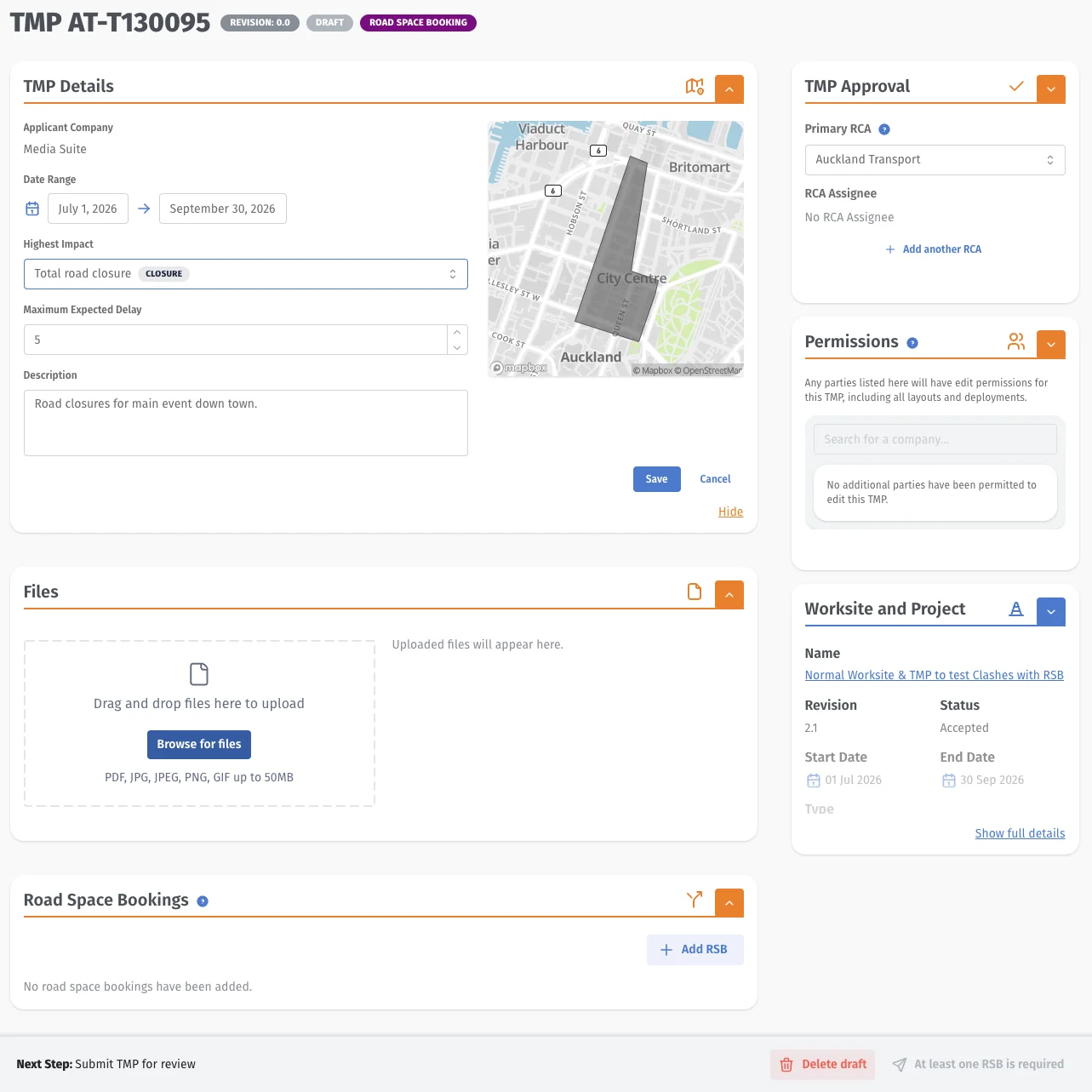
Your TMP now sets the limits that every booking has to fit inside, and on a site-specific TMP the bookings go in with it.
- Fill in the new TMP details carefully. The date range, highest impact and maximum expected delay are the ceiling for every booking. Set the highest impact to your worst stage and leave the date range room for contingency. myWorksites warns when a booking goes over.
- Site-specific TMPs need their bookings at submission. myWorksites won't submit the TMP without at least one, and changing a site-specific booking later currently means a TMP revision. Get the dates and the contingency right first time.
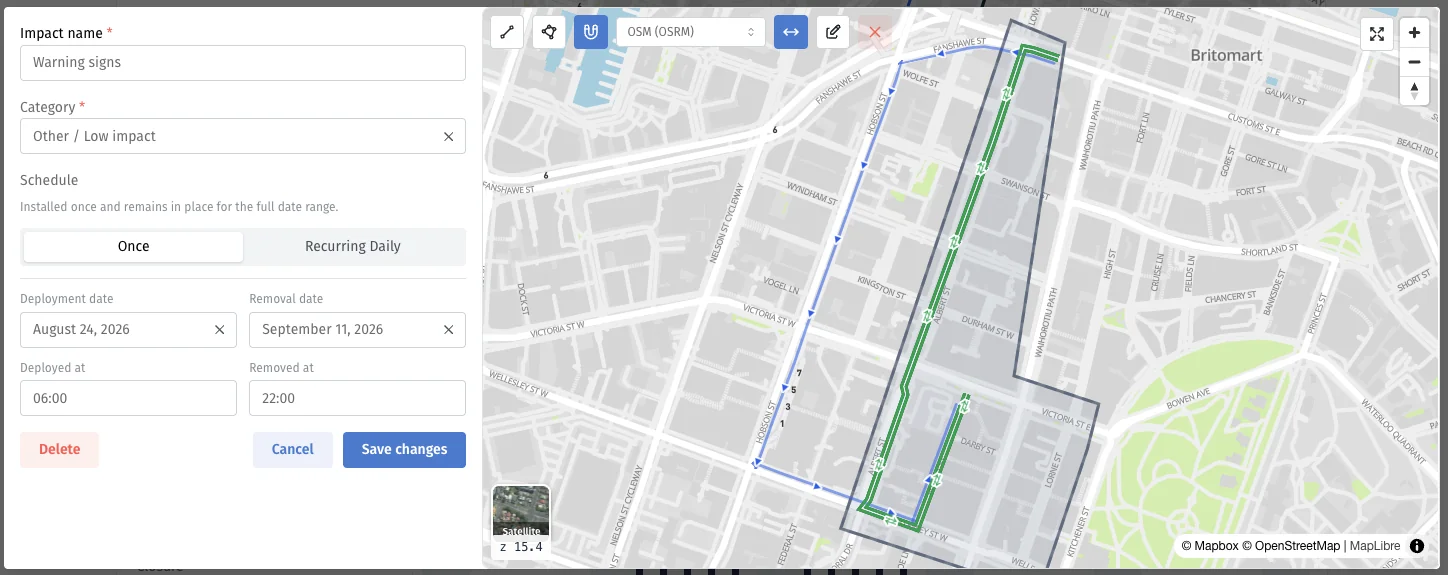
- Design in impacts. Each stage or traffic management arrangement becomes its own impact, so make your stages clear and name them the way NZTA wants: [work activity] - [traffic management method], using NZTA's standard terms (listed below).
- Show the attended hours and what stays out. Whoever books needs to know when the site is staffed and what stays overnight and at weekends, because that becomes the unattended impact.
- Draw detours one direction at a time. Each direction of a signed detour is its own impact, labelled with the direction.
- Make the footprint obvious. Bookings must cover the full TTM footprint, first sign to last sign, including signs on side roads. Your layout is where that comes from.
- Check the regional operating plan (ROP). Booking dates and times must fit the TMP and the RCA Operating Plan, unless there's a specific approval to work outside them.
- Allow more lead time. Asked whether site-specific TMPs now need to go in more than two weeks ahead so the booking can be in a week ahead, NZTA said yes.
- Road closures need a site-specific TMP. In NZTA's Desert Road example, a road closure can't run under a PARS, even on an IDC.
- Big staged projects: NZTA's guidelines ask you to contact the RTTMC ([email protected]) about how to set up the bookings.
- Under a PARS, each job will be its own booking made by the contractor later. Set the PARS's impact category and expected delay to cover the worst job it's meant for.
If you're the contractor
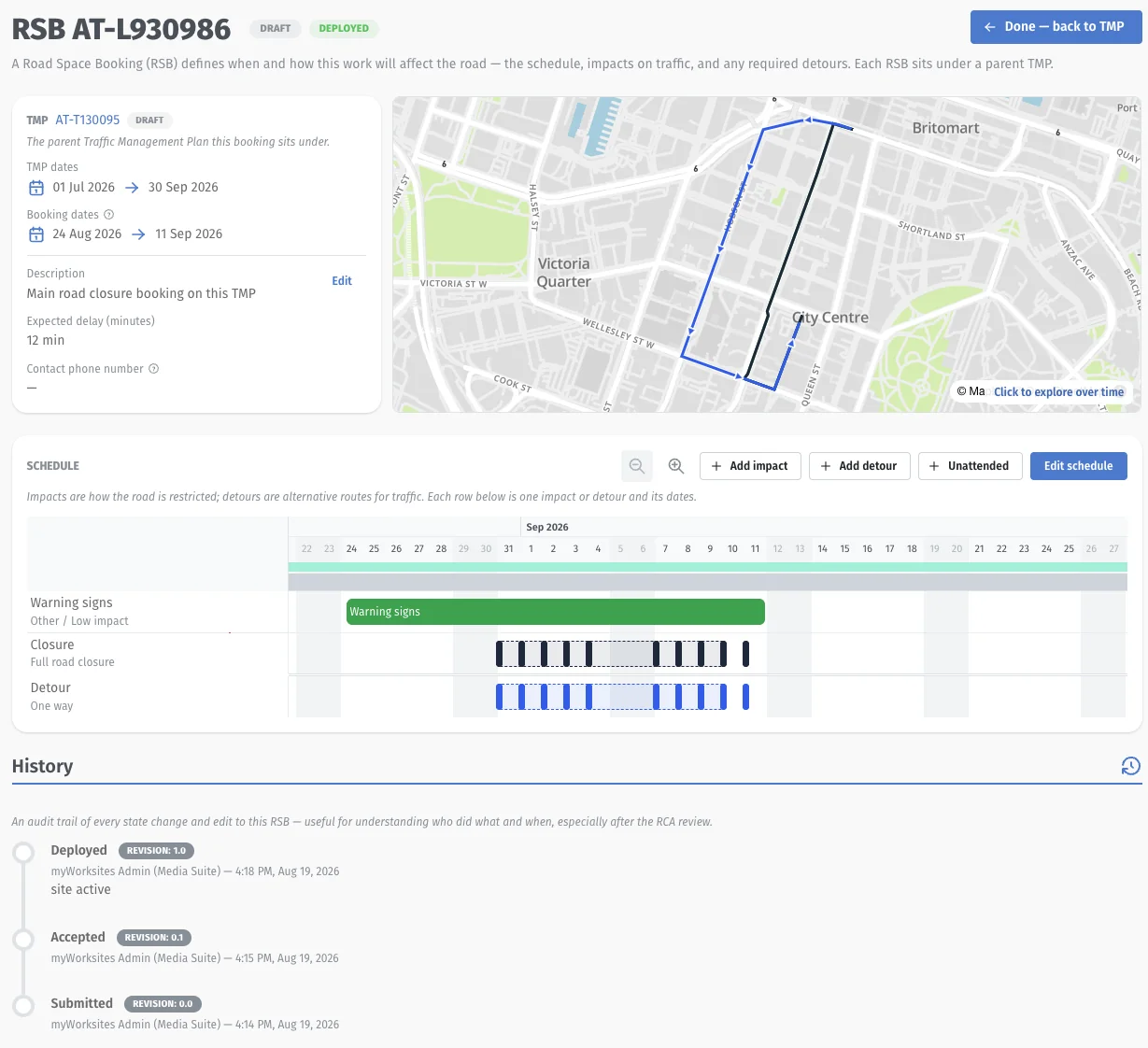
You (or your office, with the Contractor role in myWorksites) make, submit and close the bookings.
- One booking per work site. Continuous or connected work, such as chip sealing over several kilometres, can be one booking with an impact for each section. Two locations at one intersection are two bookings.
- Under a PARS, create the booking once the PARS is accepted, for each job.
- Submit by 4pm Wednesday for the next Sunday to Saturday week. Earlier is better: it helps clash checks and, where two jobs clash, who gets the road.
- Write a real description. Say what the work is, the road and the suburb or town: "Lane closure for manhole inspections on SH45, New Plymouth", not "Utility works". Don't paste the TMP's generic description.
- Book only the time you need. Five days of work is five days of booking. Add contingency as separate impacts, with "contingency" in the description.
- Add unattended impacts for nights and weekends when TTM stays out. You don't need one when the road looks the same day and night (a shoulder closure left in place) or when all TTM comes off each day.
- Check for clashes on the full map with nearby impacts on before you submit.
- Any edit sends the booking back to draft. Resubmit it yourself; myWorksites won't.
- Add every organisation to the TMP that will update, deploy or complete the booking, such as your TTM subcontractor, and give your STMS the STMS role. A missing organisation or the wrong role is one of the most common support calls.
- Complete the booking when the whole job is done. Only office users can.
- Keep it current. NZTA uses bookings to tell the public what's on the road.
- No booking needed for short, non-invasive work such as surveys and inspections.
- The old spreadsheets (deployment sheet, IDC shared works information) stop only once bookings are well established. Check with the RTTMC ([email protected]) what they still want.
- Existing PARS on layouts can be converted to bookings by the myWorksites team on request.
If you're the STMS
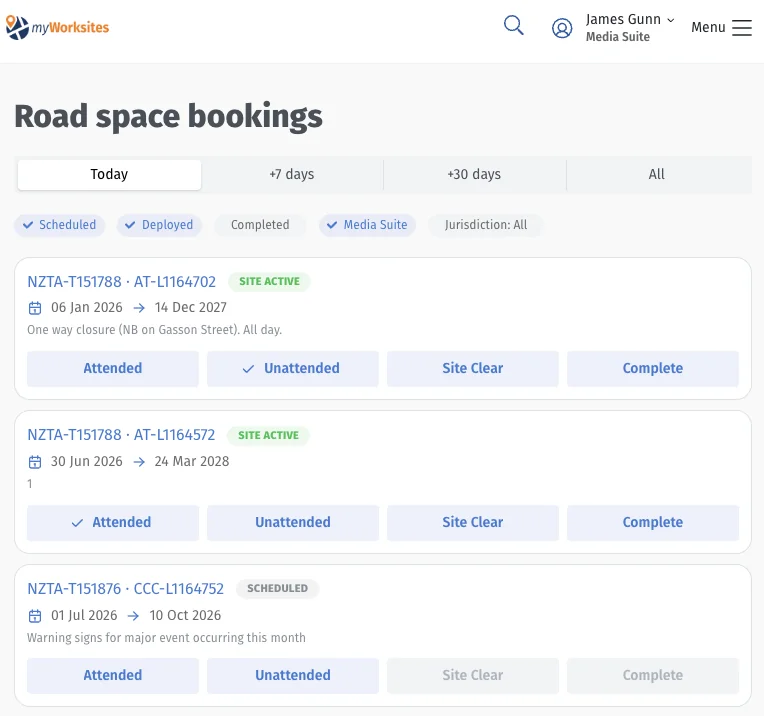
You update the booking from site. The deployment page works on a phone. You need the STMS role, and your company must be added to the TMP.
- Site Active (the Attended button on the pilot screens) when TTM is about to go in. Then use the impact toggles to show what's actually out, such as switching from a two-lane diversion to stop/go and back.
- Unattended when TTM stays out but nobody is watching it.
- Site Clear when all TTM is off the road, even if you're back tomorrow.
- You don't press Complete. The office closes the booking when the whole job is finished.
A booking can't jump from scheduled to complete. If what you put out doesn't match the schedule, myWorksites warns you but doesn't stop you.
Impact names and NZTA's standard terms
Name each impact [work activity] - [traffic management method]. NZTA's examples:
- Chip sealing - stop/go MTC (alternating flow)
- Manhole inspections - lane closure
- Unattended loose chip - signage only (with TSL)
- Culvert clearing - shoulder closure
The method part comes from NZTA's standard terms:
| Impact level | Terms |
|---|---|
| High Road is closed | Road closure; One-way closure; Ramp closure |
| Medium Capacity is reduced | Lane closure (only where there are two or more lanes each way); Lane shift/diversion; Contraflow operation; Stop/go MTC (alternating flow); Stop/stop MTC; Mobile operations; Semi-static operations; Unmanned temporary traffic lights; Pathway diversion |
| Low Road is available | Signage (with TSL); Signage (detour only); Signage (advisory/warning only), including mobile VMS; Shoulder closure; Parking restriction; Low impact/non invasive activities |
A worked example: chip sealing
From NZTA's guidelines: chip sealing at one location on SH3 under a PARS, with stop/go while sealing, signs and a temporary speed limit left out overnight and at weekends, and a week of contingency for weather.
- Bookings: one, because it's one site.
- Impacts: four. Chip sealing - stop/go MTC. Unattended loose chip - signage (with TSL). The same two again for the contingency dates, labelled as contingency.
- Description: "Chip sealing operation on SH3 including unattended loose chip management and temporary speed limits", not "PARS maintenance activities".
If the crew works Monday to Friday, 9am to 4pm, the unattended impact covers 4pm to 9am each night and the whole weekend.
Who's using bookings
| Road controlling authority | What myWorksites says |
|---|---|
| NZTA (state highways) | Optional from 22 October 2026. Required for all new TMPs from 9 November 2026. |
| Auckland Council | Piloting. Applicants can choose RSBs from 30 November 2026; the date they become required is still to be confirmed. |
| Invercargill City Council and Southland District Council | Piloting. Dates still to be confirmed. |
| Every other RCA | Still on layouts in myWorksites, with its own road space booking process if it has one. |
Wellington and Wairarapa state highways, including Transmission Gully, are run by the Wellington Transport Alliance, which has moved its TMPs from Submitica to myWorksites, so bookings there work the same way. NZTA's access page still mentions Submitica for these roads; if your TMP is in myWorksites, the Road Space Booking option sits under it. Auckland motorways and the Pūhoi to Warkworth motorway are reviewed by local teams rather than the RTTMC.
Existing TMPs on layouts stay editable until their end dates. This page is a summary: NZTA's guidelines for road space bookings (October 2026, linked below) have seven worked examples, and they win if anything here differs.
Before any booking, the TMP itself still has to pass review. For what reviewers look for, see Checking a TMP before you submit.
Questions
When do Road Space Bookings become mandatory on state highways?
From 9 November 2026, myWorksites requires RSBs for all new TMPs on NZTA state highways. They were optional from 22 October 2026. Other councils are still on layouts, except Auckland Council and Invercargill and Southland, which are piloting them.
When do I have to submit a Road Space Booking?
Before 4pm on the Wednesday before the week the work starts. NZTA counts a work week as Sunday to Saturday. Earlier is better.
Can I start work once my TMP is accepted?
Not on an NZTA state highway. NZTA says an endorsed TMP or a CAR is not permission to occupy the network; the Road Space Booking is.
What does a TMP designer need to do differently?
Set the TMP's date range, highest impact and maximum expected delay so every booking fits inside them, design each stage as a clear impact named the NZTA way, show attended hours and what stays out overnight, and draw each detour direction separately. On a site-specific TMP the bookings go in with the TMP.
How do I name impacts in a Road Space Booking?
NZTA asks for [work activity] - [traffic management method], using its standard terms, for example "Chip sealing - stop/go MTC (alternating flow)" or "Culvert clearing - shoulder closure".
Do I need a separate booking for each site?
Yes, one booking per distinct work location. Continuous or connected work, such as chip sealing over several kilometres, can be one booking with an impact for each section.
Do inspections need a Road Space Booking?
No. NZTA's guidelines say short-term non-invasive activities such as surveying or inspections don't need one.
Who can complete a Road Space Booking?
Only office users with the myWorksites Contractor role. The STMS marks the site active, unattended or clear.
Sources
- NZTA, Guidelines for road space bookings, October 2026: https://nzta.govt.nz/assets/Roads-and-Rail/accessing-our-state-highways/nzta-guidelines-for-road-space-bookings-october-2026.pdf (checked 5 November 2026)
- NZTA, Full NZTA TTM process in myWorksites, webinar 1 slide pack, 22 October 2026: https://www.nzta.govt.nz/assets/Roads-and-Rail/accessing-our-state-highways/RSB-webinar-1-slide-pack.pdf (checked 5 November 2026)
- NZTA, The end-to-end NZTA TTM process within myWorksites, webinar Q and A overview (22 October 2026): https://www.nzta.govt.nz/assets/Roads-and-Rail/accessing-our-state-highways/webinar-1-QA-overview.pdf (checked 5 November 2026)
- NZTA, Showcasing the new Road Space Booking functionality, webinar, 4 November 2026: https://www.youtube.com/watch?v=vTSGBUjx46g (checked 5 November 2026)
- NZTA, myWorksites and Road Space Booking webinars: https://www.nzta.govt.nz/partners/traffic-management/accessing-our-state-highways/webinars (checked 5 November 2026)
- myWorksites Help Center, TMPs with Road Space Bookings: https://help.myworksites.co.nz/en/articles/16450884-tmps-with-road-space-bookings (checked 5 November 2026)
- myWorksites Help Center, August 2026 release notes, Road Space Bookings: https://help.myworksites.co.nz/en/articles/16755778-august-2026-release-notes-road-space-bookings-rsbs (checked 5 November 2026)
- NZTA, Managing access to the state highway: https://nzta.govt.nz/roads-and-rail/accessing-our-state-highways/managing-access-to-the-state-highway (checked 5 November 2026)
Last checked: 5 November 2026